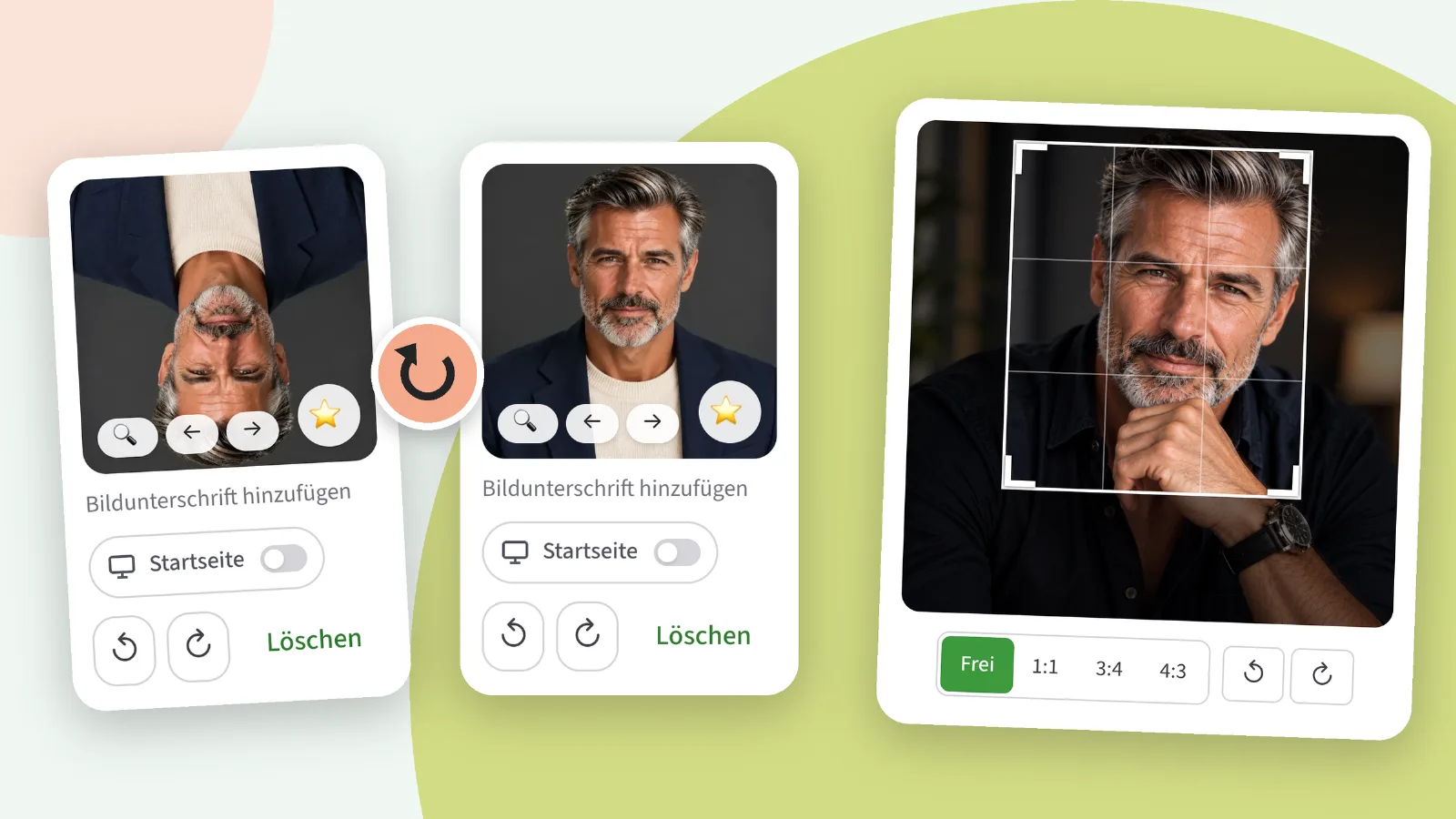
The reason for this week’s biggest update was a single image: it arrived in the check as rotated by 180 degrees, and neither the member nor we were able to turn it the right way up. That’s now possible – and whilst we were at it, we built in the cropping feature as well.
New: Rotating images
Under every image in your album, in your galleries and in your private images, you’ll find two buttons: ↺ and ↻. One click rotates the image a quarter turn to the left or right, as many times as you like. Mobile photos that ended up sideways or upside down can thus be corrected in a matter of seconds.
A rotated image doesn’t need to be re-reviewed. It’s the same image with the same pixels, just the other way round; the rating stays the same, and your image is visible again straight away. The only exception: images that the team has blocked cannot be rotated.
New: Cropping before uploading
When you select a photo for an album or gallery, you’ll now first see it within a frame with four corner handles. Drag the corners to choose the crop, and drag within the frame to move it. You can crop freely or choose a fixed aspect ratio – 1:1, 3:4 or 4:3 – and rotate the image in the same place at the same time. If you prefer to use the keyboard: the arrow keys move the frame, whilst holding down Shift changes its size.
Why only before uploading and not afterwards? Because our verification team needs to see exactly the same image that will appear on your profile later. An image cropped after uploading would be considered a new image and would have to go through the verification process again. If you later decide you don’t like a particular crop, simply re-upload the photo and crop it differently.
To be honest: intimate images and images sent via chat are still uploaded directly; there’s no cropping option for those yet. And if you don’t want to crop anything, just carry on clicking – then the photo will be uploaded as before.
Improved: ‘Places’ in the menu – and a menu for tablets
The locations pages were there, but you had to know where to find them. Now ‘Locations’ appears in the menu, next to ‘News’ and ‘Radio’. The section is no longer called ‘Entertainment’ but simply ‘More’ – ‘Locations’ didn’t really fit under ‘Entertainment’.
On closer inspection, we noticed something rather embarrassing: there was no navigation at all on tablets. The sidebar only appears on large screens, but the menu bar at the bottom used to cut off at mobile width. Only the header remained in between. The bottom menu bar now applies to everything below the sidebar; the radio player sits above it rather than behind it.
On the location pages themselves, the member tiles now span the full width on mobiles: three side by side instead of two and a half with an empty third on the right.
Fixed: two minor issues
During video calls, the message ‘Connecting’ appeared next to the call duration for the entire duration of the call. The connection had long since been established; it was just that the message hadn’t caught up. It now disappears as soon as you can see each other.
And on the toggles in the settings, a long label on mobile devices was cut off with ‘…’ – ironically, on the stealth toggle, this meant the name under which the app appears on the home screen was missing. The labels now wrap to the next line.
If you notice anything: the “Report a bug” button is at the very bottom of every page, and under Account › My requests you can see what’s become of it.